
July 15, 2025

November 12, 2026
Editorial Disclaimer
This content is published for general information and editorial purposes only. It does not constitute financial, investment, or legal advice, nor should it be relied upon as such. Any mention of companies, platforms, or services does not imply endorsement or recommendation. We are not affiliated with, nor do we accept responsibility for, any third-party entities referenced. Financial markets and company circumstances can change rapidly. Readers should perform their own independent research and seek professional advice before making any financial or investment decisions.
Google Ads can show your Target CPA as met while your cash drawer stays empty. The usual culprit is treating your break-even CPA as the Target CPA. Break-even means no loss, but it also means no money for salaries or growth.
From 17 August 2026, Google says budget-limited campaigns deliver closer to the target you set. When that number equals break-even, the algorithm can spend every penny of budget with zero profit. This guide explains how to turn that ceiling into a target that both protects and grows your margin.

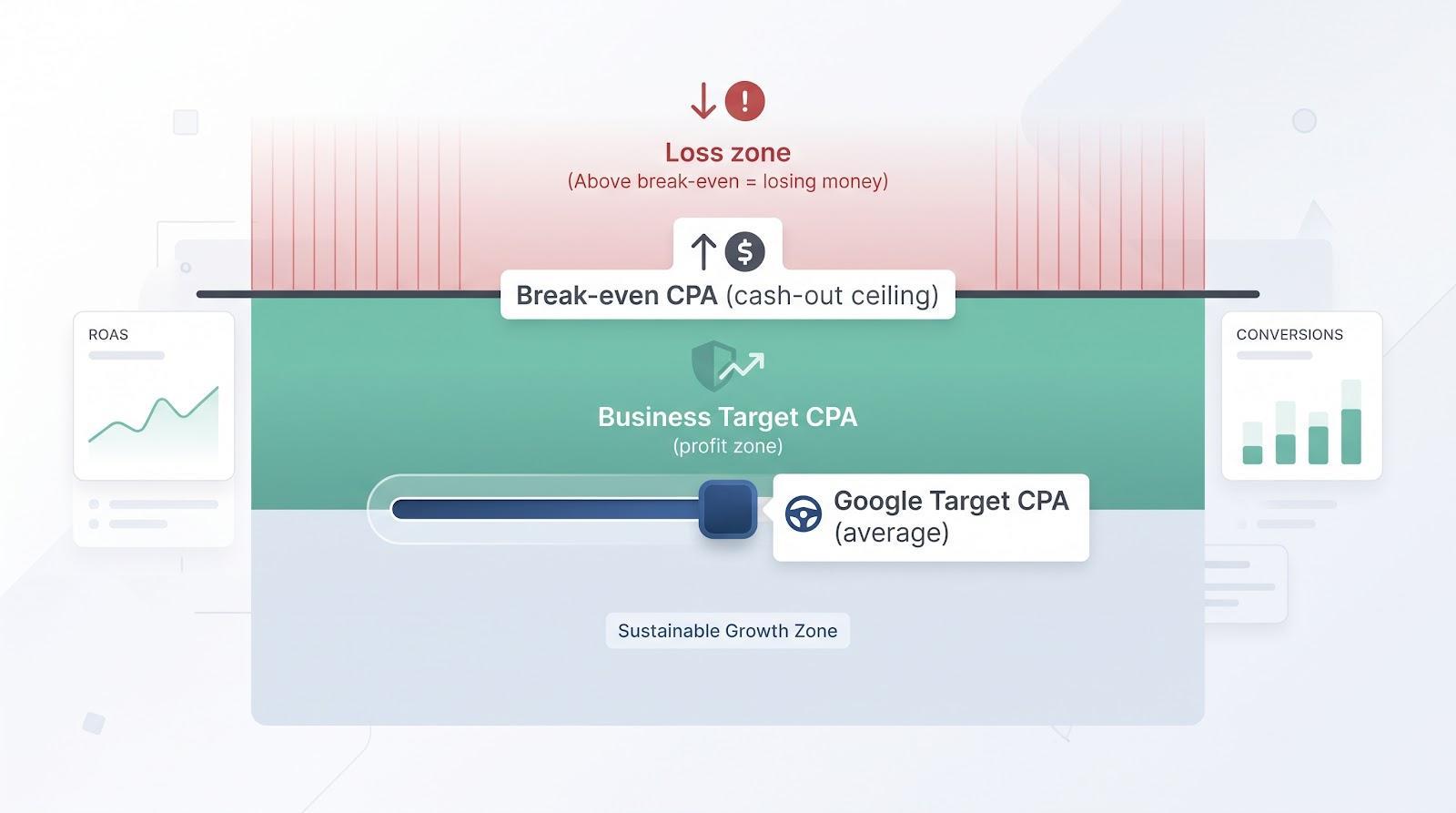
Before you adjust a bid setting, confirm which number you are discussing. Break-even CPA marks the cash-out ceiling and business target CPA is the profit-friendly goal. Google's Target CPA is only the average price the algorithm aims to hit.
Actual CPA = ad spend ÷ number of counted conversions. In plain terms, it tells you how much media spend each recorded order or lead cost.
That figure is useful only when the “conversion” truly signals revenue. Google lets you tag almost any action as a conversion and, unless you separate them, rolls newsletter sign-ups, demo requests and purchases into one tally. The Google Ads help centre advises declaring only revenue-critical events as primary conversions and demoting the rest to secondary status.
Pin down one revenue-relevant goal before you chase efficiency. A raw lead that closes 1 in 20 times is not equal to an ecommerce checkout, even though both flash green inside Google Ads.
Break-even CPA = net revenue per sale minus all variable costs. Spend even one cent more and the order drains cash.
Start with the money you actually keep from an order, then subtract every cost that scales with that sale: COGS, card fees, shipping subsidies, a returns allowance and sales commission. The contribution that remains is the most you can pay to win that conversion. That single number is the break-even CPA.
For example, a product sells for $120 and variable costs total $70, so contribution is $50. Pay $50 for the conversion and you break even. Pay $51 and the order burns $1 in real money, an easy oversight when Smart Bidding runs unchecked.
Results like these depend on fixing the whole funnel, not just the bid. Review management software firm Reputation Trojan needed better customer acquisition in a highly competitive market. In its Reputation Trojan case study, the PPC Masterminds team redesigned the website and rebuilt the Google Ads, Facebook and retargeting campaigns. Over six months, conversions rose 1.75× while cost per conversion fell by more than 55 percent.
Business target CPA = break-even CPA minus required profit per conversion (or break-even × acquisition share if you prefer a percentage).
Breaking even keeps the lights on, but it does not grow the company. Decide upfront how much of each order's contribution you are willing to exchange for a customer:
Choose the rule that fits your margin, cash runway and growth plan. Google's profit bidding notes remind advertisers to supply the profit they can afford to trade for growth, not merely revenue. Review the number monthly and avoid copying someone else's shortcut, because your P&L decides the margin you can spare.
Google's Target CPA is an average price signal, not a spending ceiling. Google notes that some conversions may cost more than your target and some may cost less, yet the system will try to keep overall cost per conversion equal to the figure you set.
Set the target well below recent performance (say you averaged $40 last month but type $25) and Smart Bidding simply skips auctions it cannot win at that price, so conversion volume falls. Google confirms that setting a target that is too low may result in fewer total conversions.
Push the target above break-even and the algorithm spends right up to that higher average, even when cheaper conversions are available. Treat the Target CPA box like a thermostat: it nudges the room towards a temperature, but some corners still run hotter than others. Feed it a number anchored in your business target CPA, never the break-even ceiling.
Before you crunch numbers, remember the goal: isolate every variable cost so the final figure is the last cent you can pay for a conversion without losing money. The steps below cover three common models: ecommerce, lead generation, and subscription or SaaS. Skim to the one that matches your business, then work through Steps 1 to 5 in order.
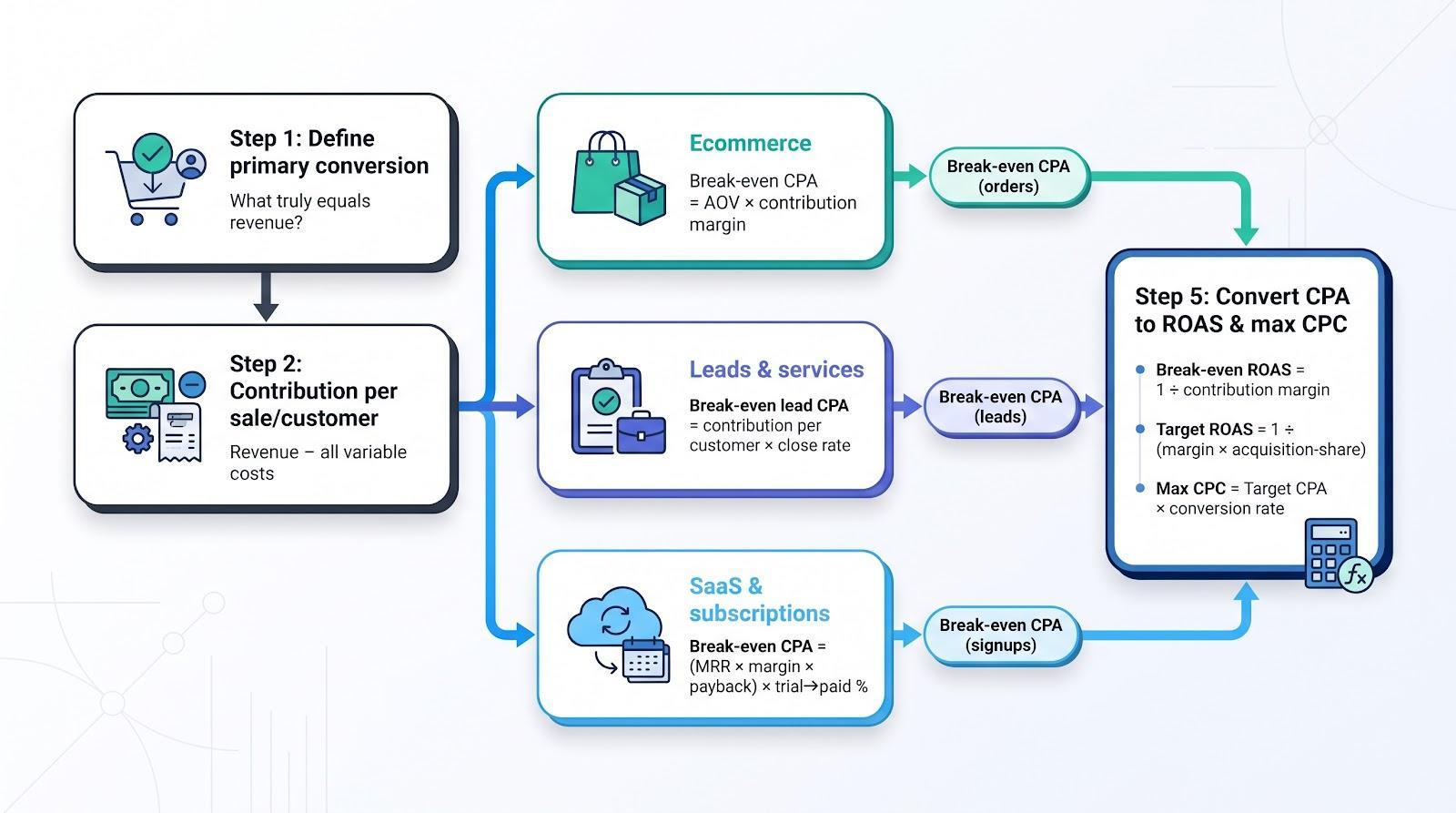
Before you touch a calculator, decide which single action truly equals revenue for your business. Google lets you tag almost any action as a conversion, but only the actions marked Primary feed Smart Bidding. Everything else should be set as Secondary (observe only).
Pick the moment that drives cash:
Double-check that pixels, CRM imports and offline conversions all roll up to that same primary definition. Nail this step and every figure downstream speaks the same language. Skip it and the maths becomes polite fiction.
Formula: break-even CPA = average order value × contribution margin (after all variable costs).
Start with your average order value, then deduct every cost that scales with the sale: payment processing, pick and pack labour, packaging, subsidised shipping and an allowance for returns. Google's profit-based bidding guidance calls these variable costs that should be removed from revenue before you optimise for profit.
| Item | Amount |
|---|---|
| Sale price | $120 |
| COGS and packaging | minus $45 |
| Payment fees (3%) | minus $3.60 |
| Shipping subsidy | minus $8 |
| Returns allowance | minus $6 |
| Contribution before ads | $57.40 |
Your break-even CPA is therefore $57.40. Spend $57 and you are roughly even, but spend $60 and you lose $2.60 on that order. Remember that fixed expenses such as office rent, software and your salary still need covering, so your business target CPA will sit well below this ceiling.
Formula: break-even lead CPA = customer contribution × lead to customer rate.
Service businesses do not get paid when a form fires, because you still have to qualify, quote and close. That funnel shrinkage must be priced into your allowable lead cost.
| Metric | Value |
|---|---|
| Revenue per consulting project | $4,000 |
| Variable delivery costs (40%) | minus $1,600 |
| Contribution per customer | $2,400 |
| Lead to customer close rate | 25% |
| Break-even lead CPA | $2,400 × 0.25 = $600 |
Spend $600 and you are even. Spend $601 and profit evaporates.
To preserve profit, decide how much contribution you will keep. If 60% of contribution funds ads, your business target lead CPA is $2,400 × 0.25 × 0.60 = $360.
If the close rate slips to 15%, break-even falls to $360 and the profit target CPA to $216. Same media, different sales performance. Marketing maths should never live in a silo.
Formula: break-even signup CPA = (monthly revenue × gross margin × payback window in months) × trial to paid conversion rate.
Subscriptions drip cash in monthly instalments, while acquisition cost lands on day one. Your first question is therefore, “Within what window do we need to earn the money back?”
Pick the shortest payback span your cash flow can handle (three, six or twelve months are common). Multiply monthly revenue by gross margin for that period, then multiply again by the percentage of trials or sign-ups that convert to paying customers. The result is your break-even customer acquisition cost.
| Metric | Value |
|---|---|
| Revenue per seat per month | $200 |
| Gross margin | 80% |
| Payback window | 12 months |
| Trial to paid conversion | 20% |
| Contribution in window | $200 × 12 × 0.80 = $1,920 |
| Break-even signup CPA | $1,920 × 0.20 = $384 |
Stretching the window to 24 months doubles theoretical contribution, but it also doubles the cash you must front-load. Unless you have deep reserves or external funding, anchor the calculation to the shortest window you can comfortably finance. Break-even is a maths fact, while affordability is a survival choice.
Google recommends Target ROAS or “Maximise conversion value” when order or lead values vary materially.
To switch from CPA to ROAS, suppose you keep $0.40 of every revenue dollar. Break-even ROAS = 1 ÷ 0.40 = 2.5 (250%), so spend $1, earn $2.50, and you are even. Need to keep 40% of contribution? Target ROAS = 1 ÷ (0.40 × 0.60) ≈ 4.17 (417%), which gives a higher ROAS and a deeper cushion.
Now move the other way, to CPC. A target CPA of $40 × a 5% conversion rate = a $2 maximum CPC. The same page at a 2% conversion rate gives $40 × 0.02 = $0.80 maximum CPC.
Use these conversions to sanity-check bids. If the auction asks more than your maximum CPC or delivers less than your target ROAS, the upstream economics need work. Fix price, margin or conversion rate before trusting the maths.
Break-even keeps you out of the red, but it never fuels growth. Several problems explain why you need a margin beneath that line.
Hit break-even and every cent of contribution is gone. Nothing remains for salaries, software or inventory.
Supplier price hikes, leaked promo codes or a dip in close rate all lift the real break-even point. Without headroom, the next surprise flips profit to loss.
Google's Target CPA help page states that “some conversions may cost more than your target and some may cost less.” Set a $40 target, collect one $20 sale and one $60 sale, and the dashboard reports success while cash flow disagrees.
Google's help page on the change says budget-limited campaigns that used to beat their targets now deliver closer to the target you set. If that figure equals break-even, Smart Bidding now steers towards your zero-profit ceiling. Audit every legacy target and drop it to the profit-preserving business CPA before you raise Q4 budgets or launch promotions.
Google attributes a conversion to the day of the click, even if the purchase or signup lands days (or up to 90 days) later, depending on your conversion window. This delay means yesterday's report may miss late-arriving conversions, inflating CPA and deflating ROAS. To fix it, use one of these approaches:
Stable feedback lets Smart Bidding optimise. Knee-jerk edits during the lag window usually throttle healthy campaigns.
Formula: incremental CPA = (cost in scenario B − cost in scenario A) ÷ (conversions in B − conversions in A).
Smart Bidding grabs the easiest conversions first. As you raise budgets, the algorithm joins pricier auctions to win harder-to-convert users, so the incremental CPA rises even while the average still looks healthy.
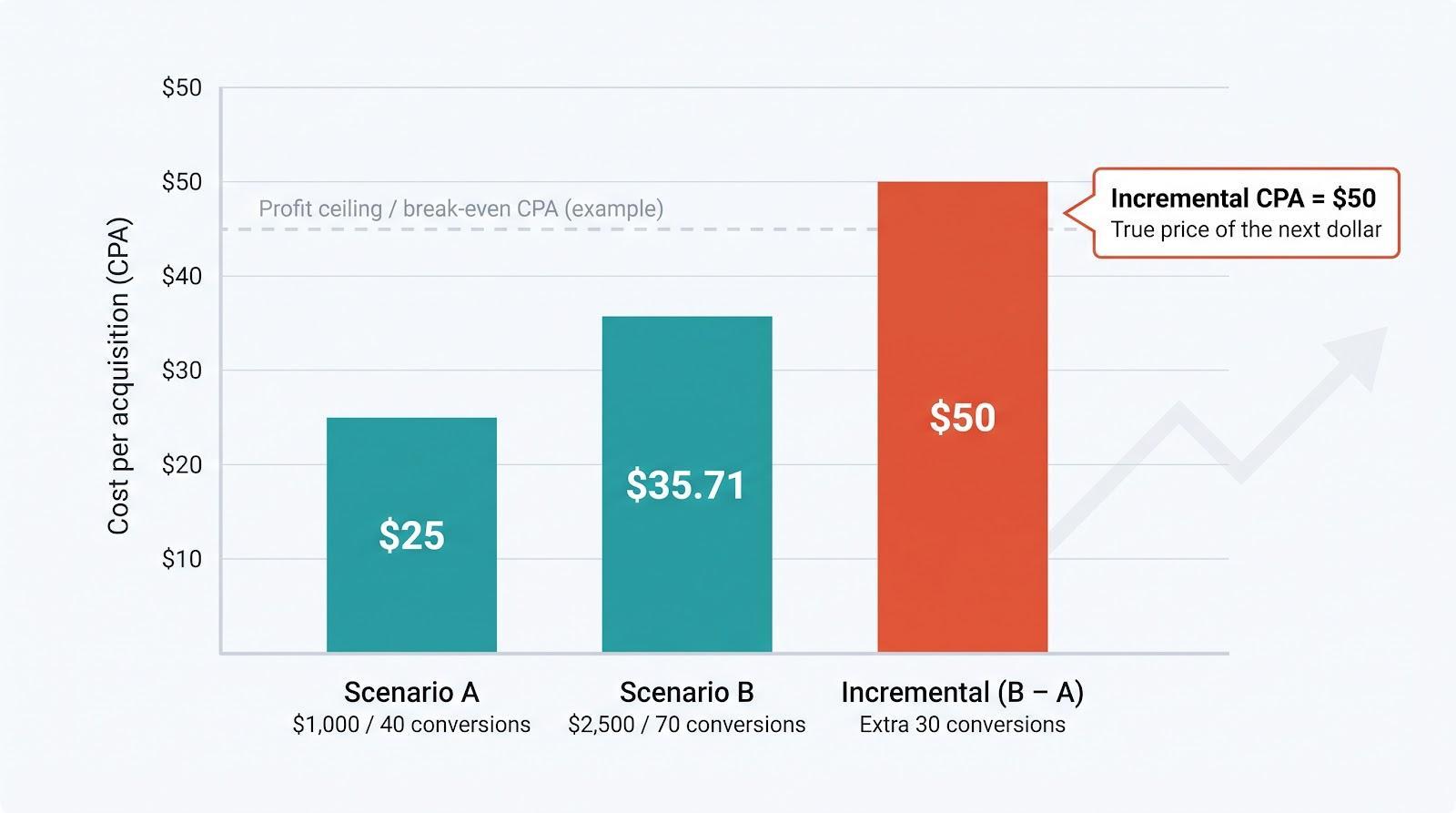
| Spend | Conversions | Average CPA | Incremental CPA |
|---|---|---|---|
| $1,000 | 40 | $25 | n/a |
| $2,500 | 70 | $35.71 | ($2,500 − $1,000) ÷ (70 − 40) = $50 |
The blended figure shows $35.71. Yet every extra sale after the first $1,000 of budget costs $50, double the initial price.
Check this in your account with the Target CPA bid simulator. Google notes that simulators estimate how many conversions your ads might receive if you set different CPA or ROAS targets. Cap budgets or raise targets where incremental CPA crosses your profit ceiling, otherwise the next dollar of spend erodes margin even though the dashboard average still looks fine.
Before you type a number into Google Ads, lock down four guardrails. These are how much contribution you will give up, how fast you need payback, what happens under stress tests and the buffer that keeps you safe.
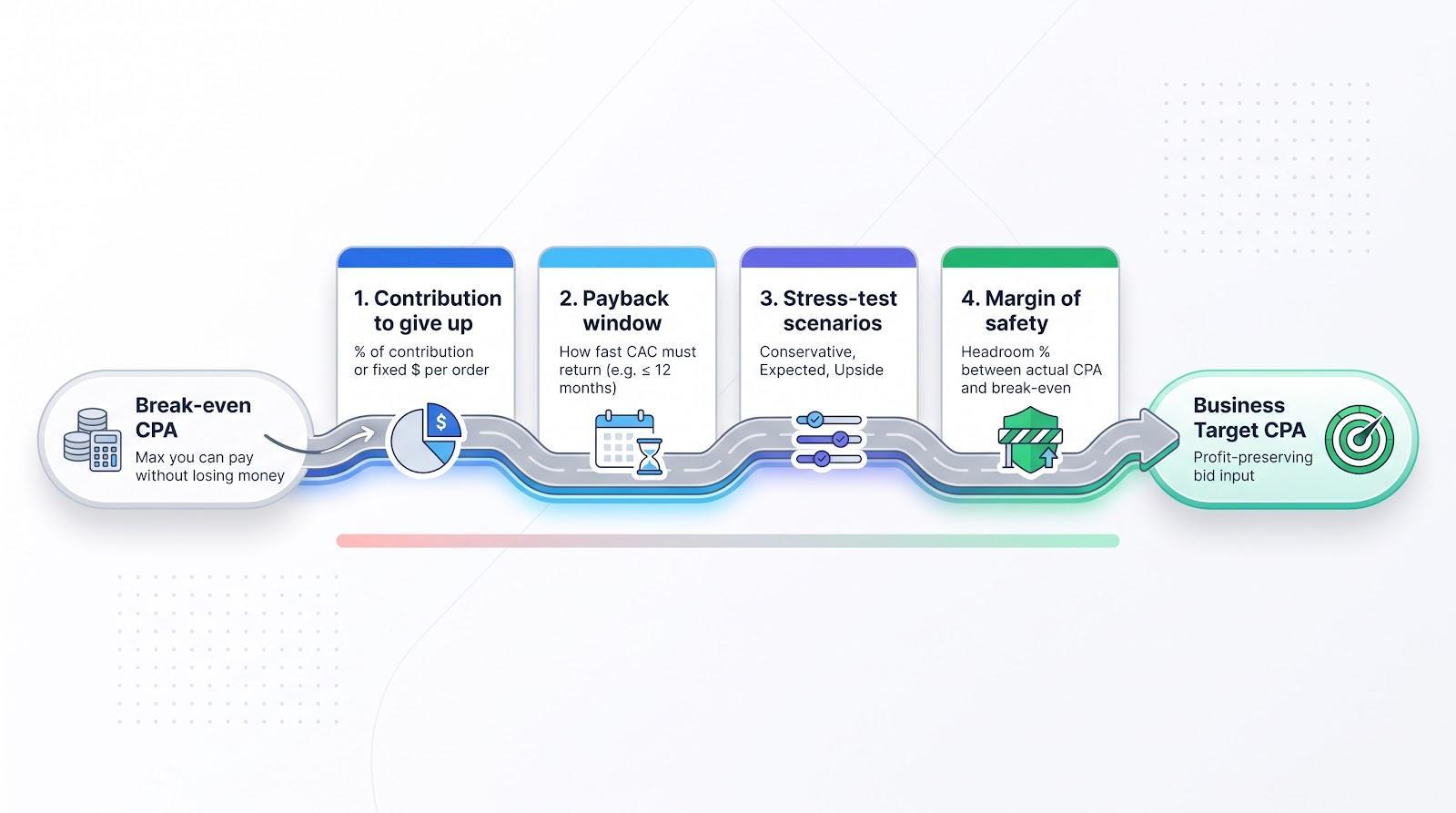
Choose a rule you can explain to finance, such as “we will spend up to 40% of contribution” or “each sale must leave $15.” Write it down and review it monthly. Google's profit guidance says inputs should reflect the profit you can afford to trade for growth, not just revenue.
Each extra month you wait to earn back CAC ties up cash. High Alpha's 2025 SaaS Benchmarks Report links short CAC payback with stronger growth, and bootstrapped businesses often insist on first-order profit. Pick the shortest window your balance sheet can fund, document it, and treat lifetime value as upside, not oxygen.
| Scenario | Key tweaks | Why it matters |
|---|---|---|
| Conservative | Lower CVR, higher CPC, smaller AOV, more refunds | Survive bad weeks |
| Expected | Trailing 90-day averages | Monthly reporting line |
| Upside | Realistic win (for example, 5% higher CVR) | Ambition without self-delusion |
Run break-even and business CPA for all three. A wide gap between conservative and upside means you will need a bigger safety buffer in Google.
Headroom % = (break-even CPA − actual CPA) ÷ break-even CPA.
For example, a break-even CPA of $60 minus an actual CPA of $45 leaves $15, which equals a 25% buffer. Dial the cushion up if demand is seasonal or cash is thin, and dial it down for stable, high-margin products.
Label both in every report. Mixing them is how healthy campaigns get blamed for thin company profit, or bloated overhead gets excused because “Ads look fine.”
Formula: achievable CPA = average CPC ÷ landing page conversion rate.
If clicks cost $2 and the page converts at 5%, the hard-wired CPA floor is $2 ÷ 0.05 = $40. Need a $30 business target? Then CPC must fall, conversion rate must rise, or both, because the maths will enforce the price whether you like it or not.
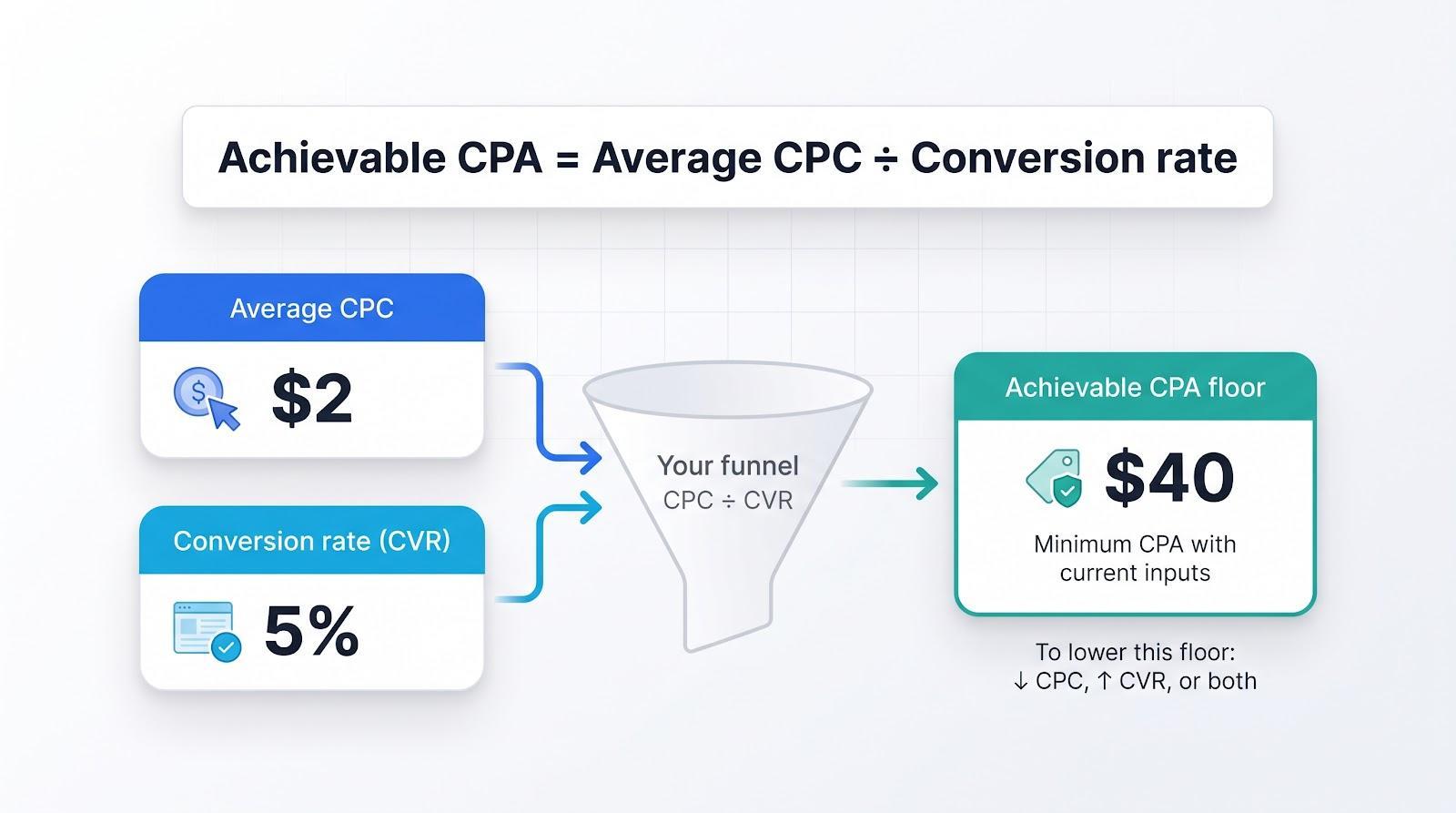
Run the calculation separately for non-brand search, brand, remarketing, Performance Max and other streams. Each stream has its own economics, and a blended average hides profit pockets and pain points.
If achievable CPA sits above your business target, locate the block:
Assign owners, fix the weakest link, then revisit the target.
Typing a lower number rarely forces cheaper conversions, because Smart Bidding simply skips auctions and volume falls. Validate new targets with the Target CPA bid simulator, Google's tool that estimates how many conversions you might receive at different targets.
When you are ready to test, use the Experiments page so the current and proposed targets run side by side. Progress means incremental customers at profitable economics, not a prettier settings screen.
As a rule of thumb, every $1 you raise price (while variable costs stay flat) lifts break-even CPA by the same $1. Bump a $100 product to $105 and contribution rises $5, so break-even CPA also rises $5 without touching bids. That extra headroom often beats weeks spent chasing cheaper clicks.
Will a higher sticker price hurt volume? Measure total contribution, not just conversion rate. If orders dip 2% but contribution per order jumps 10%, you are still ahead.
Pricing is the quiet lever most advertisers overlook, so use it intentionally. There are practical ways to raise your prices without losing clients, and each one lifts the CPA ceiling you can afford.
Check the ceiling with real variable costs, set a profit-preserving target, and stress-test it under conservative, expected and upside scenarios. Add a safety buffer, keep contribution and fully loaded views separate, and revisit every target after the August 2026 bidding change.
When gaps appear, adjust price, margin, funnel or sales performance before blaming bids. Use data, run controlled experiments, and remember that the biggest lever is not a CPC tweak. It is sound business economics baked into the target before a single click lands.
Break-even CPA is the most you can pay for a conversion before the sale loses money, so it leaves zero profit. Target CPA should sit below that figure so each conversion still leaves contribution for salaries, overheads and growth.
There is no universal percentage. Many businesses keep 20% to 40% of contribution as profit, but the right gap depends on your margin, cash runway, payback window and how volatile your costs and conversion rates are.
Smart Bidding skips auctions it cannot win at the lower price, so it enters fewer auctions and wins fewer conversions. Use the bid simulator or a controlled experiment to test a new target before applying it to the whole campaign.
No. Conversions are credited to the day of the click and can arrive days or weeks later, so the most recent days usually look more expensive than they really are. Wait at least your typical days to conversion before judging performance.

