
June 5, 2024

July 29, 2026
Editorial Disclaimer
This content is published for general information and editorial purposes only. It does not constitute financial, investment, or legal advice, nor should it be relied upon as such. Any mention of companies, platforms, or services does not imply endorsement or recommendation. We are not affiliated with, nor do we accept responsibility for, any third-party entities referenced. Financial markets and company circumstances can change rapidly. Readers should perform their own independent research and seek professional advice before making any financial or investment decisions.
Relocating an office involves much more than moving desks and furniture. Technology supports communication, customer service, security, and daily operations, making it one of the most important parts of any office transition. Without careful preparation, equipment failures or network interruptions can delay productivity and create unnecessary frustration for employees. Building a technology plan before moving day helps businesses reduce downtime and resume normal operations more quickly.

A successful move begins with documenting every technology asset in the office. Computers, monitors, printers, networking equipment, phones, conference room devices, servers, and accessories should all be inventoried before packing starts, and it is worth reading the wider tips on how to prepare for a commercial relocation alongside the technology plan. Labelling equipment by employee, department, or workspace helps simplify installation after the move.
This process also creates an opportunity to identify outdated hardware that should be replaced rather than relocated. Removing unnecessary equipment reduces moving costs while allowing the new office to begin with a more efficient technology environment. Backing up important business data before disconnecting equipment provides additional protection if unexpected issues occur during transportation.
Technology planning should begin well before employees enter the new workspace. Internet service, phone systems, wireless networks, and security equipment should be scheduled for installation early enough to allow testing before opening day.
Office layouts should also be finalised before network cables and power connections are installed. Knowing where employees, printers, meeting rooms, and shared equipment will be located allows infrastructure to support daily workflows from the start.
Businesses planning commercial audio-visual services should coordinate installation before teams begin using conference rooms. Setting up presentation displays, video conferencing systems, microphones, and speakers in advance reduces disruptions and allows meetings to begin immediately after the relocation.
Once equipment has been installed, every major system should be tested before normal business activities resume. Internet connectivity, wireless access, shared drives, printers, cloud applications, security systems, and phones should all be verified to confirm they are functioning correctly. A move is also a sensible moment to consider when to stop being your own IT department.
Individual workstations also deserve attention. Employees should confirm that monitors, docking stations, keyboards, webcams, and software applications operate as expected. Resolving these issues before full operations begin prevents small technical problems from becoming larger productivity challenges. Creating a checklist for each department helps confirm that no important equipment or business application has been overlooked.
Technology planning also includes preparing employees for the transition. Sharing moving schedules, temporary workflow changes, login instructions, and support contacts helps reduce uncertainty before relocation day.
Providing dedicated IT support during the first few days in the new office allows technical questions to be addressed quickly while minimising interruptions. Encouraging employees to report issues immediately also helps technology teams identify patterns that may require broader solutions.
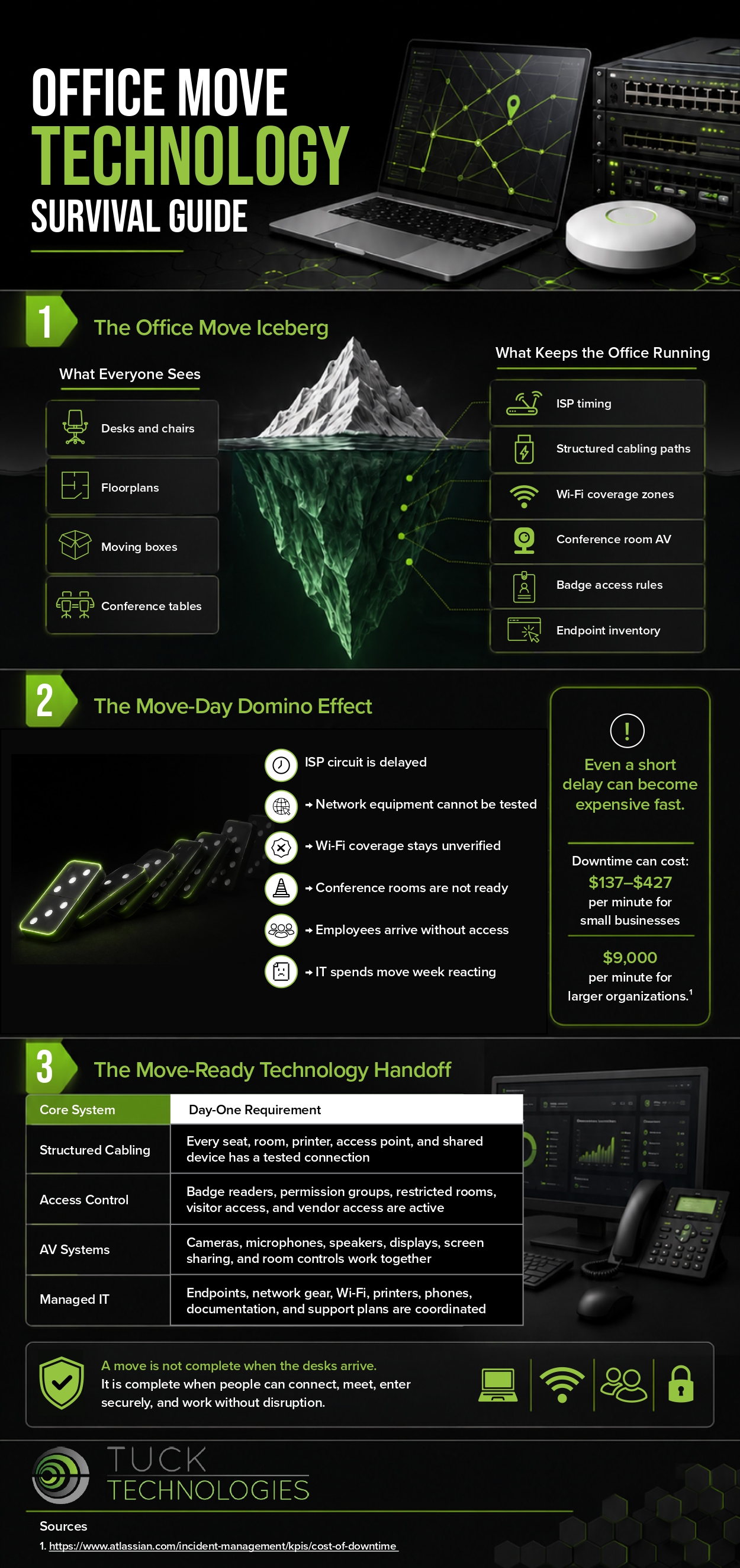
An office relocation presents an opportunity to improve both the workplace and the technology that supports it. Careful planning, thorough testing, and clear communication help businesses maintain continuity while reducing unnecessary downtime. Taking a proactive approach allows employees to settle into their new environment with confidence. Look over the infographic below to learn more.
Internet and phone provisioning drives the timeline and can take weeks or months depending on the provider and the building. Start there, then work backwards.
Connectivity that is not ready on day one. Furniture can arrive late without stopping work, but a business with no network largely cannot trade.
If hardware is near end of life, replacing it usually costs less than packing, transporting, reinstalling and then replacing it a few months later anyway.
Internet and wireless access, shared drives, printers, cloud applications, security systems and phones, followed by individual workstations, docking stations and webcams.
One named person per department works best. It keeps reporting consistent and helps IT spot patterns rather than fielding the same fault repeatedly.
