
July 13, 2023

October 30, 2026
Editorial Disclaimer
This content is published for general information and editorial purposes only. It does not constitute financial, investment, or legal advice, nor should it be relied upon as such. Any mention of companies, platforms, or services does not imply endorsement or recommendation. We are not affiliated with, nor do we accept responsibility for, any third-party entities referenced. Financial markets and company circumstances can change rapidly. Readers should perform their own independent research and seek professional advice before making any financial or investment decisions.
Most video ideas die between the script and the first real generation. The script sounds clear in a doc. Then someone asks what shot three looks like, and the room goes quiet, because nobody has seen it yet.
That is the job an AI storyboard generator is supposed to solve: turn written scenes into a visual plan you can judge, share, and revise before you burn credits on final motion. In 2026, the better tools go one step further. They do not stop at still frames. They help you preview timing and motion from those boards, so script to screen is a short loop instead of a week of guesswork.

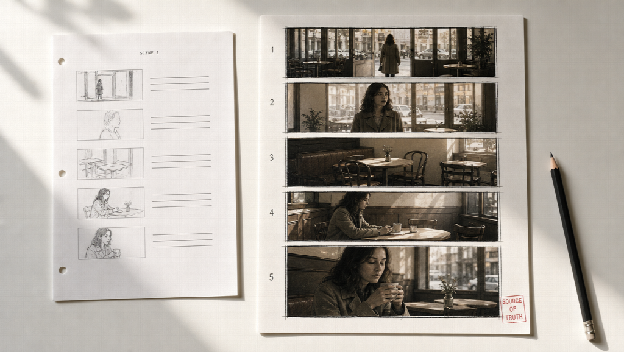
A script tells you what happens. It does not always tell you:
Teams fill that gap with verbal briefings, reference dumps, or hand-drawn boards. Verbal briefings drift. Reference dumps argue with each other. Hand boards are accurate but slow, especially when you need five concept versions by Friday.
If your workflow still jumps from script text straight into video generation, you are asking a motion model to invent coverage, pacing, and continuity at the same time. That is how projects get expensive without getting clearer. The same discipline applies to any AI production tool: teams already using an AI video generator for ad production tend to get better results when the plan exists before the render does.
A useful modern board is more than a comic strip of pretty panels. Look for three layers:
That third layer is the real gap between older storyboard apps and newer AI workflows. Static boards answer "what might it look like?" Video previews start answering "how might it play?"
Do not paste a novel. Paste scene units with objective, location, and emotional turn.
Weak:
A woman walks into a cafe and feels nostalgic.
Stronger:
INT. CAFE, LATE AFTERNOON. Maya enters, sees the empty corner table, hesitates, then sits anyway. Soft practical light. Quiet regret, not melodrama.
Let the tool visualise characters, backgrounds, and camera angles scene by scene. Review cut order before you fall in love with any single frame. If you want sharper stills for your key frames, Enterprise AI Image Generation Tools are worth testing before a look goes into the board.
Change angle, reframing, pose, or style when a panel is wrong. Do not regenerate the entire sequence because one insert feels off.
This is where Topview's AI storyboard generator is built to help: script in, visual storyboards out, then animated video previews from those boards for a complete script-to-screen pass, including style and format control for trailers, vertical ads, or shorts.
Once the board and preview feel right, final video generation has a job: execute the approved plan. It should not invent the plan.

Brand and performance teams: Test hooks, scene layouts, and aspect ratios before paid production or heavy generation.
Indie filmmakers and AI short-film creators: See multi-character or action beats early, then adjust pacing without a full reshoot mindset.
Agencies and internal creative teams: Share boards and previews so editors, clients, and animators argue about the same pictures, not three different mental movies.
No-drawing operators: If you can write a scene description, you can start. Design skill is optional; judgment is not. The same shift is happening across the content stack, which is why AI writing software is changing how businesses create content rather than replacing the people directing it.
AI boards will not rescue a broken story. They will not automatically solve complex multi-actor blocking without notes. They should not be treated as a final camera decision without a pass for continuity and brand safety.
Use the generator to make decisions faster. Keep the director role for what stays, what changes, and what gets generated next.
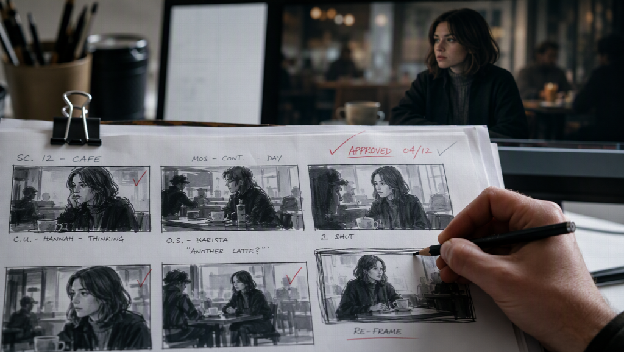
The fastest way to waste AI video credits is to generate motion before anyone has agreed on the pictures. The fastest way to protect those credits is to board the script, preview the rhythm, then generate with intent.
If your pre-production still lives in a Google Doc and a mood folder, put the script into an AI storyboard generator and make the first argument visual.
No. Ads, explainers, social stories, trailers, and animated shorts all benefit from visual planning before motion spend. Any project where several people need to agree on what a shot looks like will get value from boarding it first.
Image tools make frames. A storyboard workflow sequences scenes, keeps visual continuity in mind, and in stronger setups connects those boards to a video preview so you can judge timing as well as look.
No. You need a clear script or scene description, plus the willingness to edit angles and order. Design skill is optional, but judgment about what serves the story is not.
On Topview, the intended path is script to storyboards to video preview, so you can check timing and transitions before committing to heavier production steps.
No. Boards make decisions visible faster, but they cannot rescue a story that does not work. They also will not resolve complex multi-actor blocking, continuity or brand safety without a human review pass.
Test the idea while it's still cheap to change.
Jimmy Carr tests new material by taking a clipboard of one-liners into small venues and reading them out. When people ask why a professional needs a clipboard, his answer is simple: why memorise a joke if nobody laughs at it? If they laugh, he develops it. If they don't, it's gone.
That's what an AI storyboard really gives you: a clipboard version of your video. You can show it to a client or a colleague and see their reaction before you spend money on the final production.
So treat the preview as a test, not a formality. Show it to 3 people who match your audience, watch where their attention drops and cut those scenes first. Only then spend on the polished version. It's the same approach I take to testing ideas before you build.
